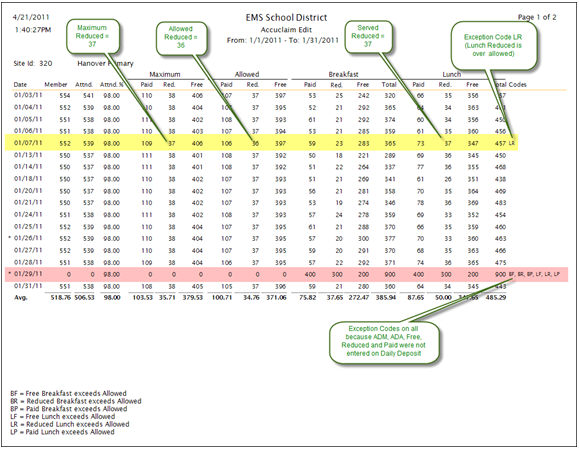
In the example highlighted in yellow: There were 37 Reduced Lunches served but only 36 were allowed based on the calculated Attendance Percentage of 98%.
In the example highlighted in pink: It shows exceptions because the ADM, ADA and Free, Reduced and Paid Max were not entered. Correcting the Accountability Daily Deposit Summary page will fix the Accuclaim report.
The first thing to do is to verify that all the membership/attendance counts and meal counts are entered correctly in the Accountability Daily Deposit.
If the ADM, ADA, or Free/Reduced/Paid Max counts on the Summary tab are incorrect, it will cause the Attendance Factor and Allowed Max to be calculated incorrectly.
If too many meals were entered by mistake, you can either edit the meal counts on the Accountability Daily Deposit Sales tab, or unclose the POS daily deposit, make corrections, and reclose the day.
There may be instances where the Accuclaim report shows an exception that is not a true overclaim.
Example:In the example highlighted in yellow above, there were 37 Reduced Lunches served but only 36 were allowed based on the calculated Attendance Percentage of 98%.
It is possible that all 37 reduced students got lunch that day.
Or there could be visiting reduced students from another school who got lunch that day.
If an exception cannot be fixed by making corrections to the Daily Deposit information, please check with your state agency to determine how it should be handle