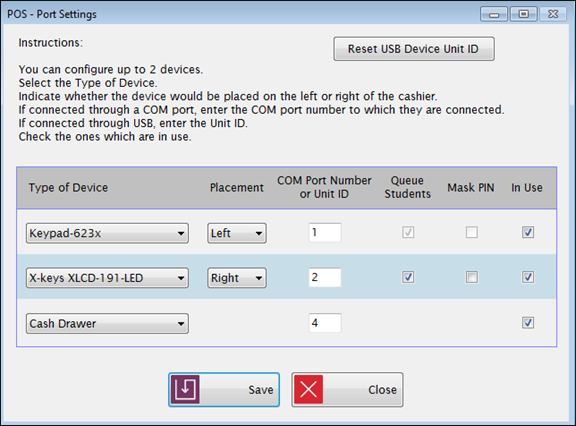
This is where you set up COM Port settings for use with external devices.
Meals Plus POS can be used with external keypads (pin pads) and barcode readers (card scanners or wand readers). Many types of devices are available and the setup will depend on the specific type of device you are using.
Standard USBdevices need no special setup or drivers installed. The operating system should recognize the device and start it automatically. However, they will handle only one transaction at a time.
COM Port devices (or USB devices with Virtual COM Port) will allow you to queue ID numbers when serving. As the ID numbers are entered, they are saved in a list for processing.
Cash Drawer devices with a USB input will allow you to seamlessly serve lunch by opening the cash drawer when the Cash or Account button is clicked.
Select Slot Reader, Keypad-904 and Keypad-623 from the devices that are supported for queuing in the Type of Device dropdown list.
Select Left or Right from the Placement dropdown list. This gives you a direction indicator on the serving screen, so you can tell which device is being used if you have two devices.
Enter the COM Port number for the device in the COM Port Number text field.
Check the Queue Students box if you want to use queuing if the device supports queuing.
Check the Mask PIN box if you do not what the PIN to show on the device display.
Check
the In Use box if this
device is currently active.
Select Cash Drawer from the last dropdown list to enable the cash drawer feature.
If cash drawer is enabled in port settings but doesn't exist, display message and allow user to continue serving.
If cash drawer is enabled and exists, the USB cash drawer will open when user selects cash or account.
Enter the COM Port number for the device in the COM Port Number text field.
Check the In Use box if this device is currently active.
©2018 EMS LINQ, Inc.
POS Version 9, revised 03/2018