 New Users: Please see Suggestions
for Setting Up Inventory Items for information on how to design a
new item file.
New Users: Please see Suggestions
for Setting Up Inventory Items for information on how to design a
new item file. This is the section where you define and manage the items you use in inventory.
New Users: Please see Suggestions
for Setting Up Inventory Items for information on how to design a
new item file.
This displays an overview of items. To get to the details, click View/Edit.
Select items by Account Categories, Bid Groups, Item Groups, or Vendors from the dropdown lists to Filter Options.
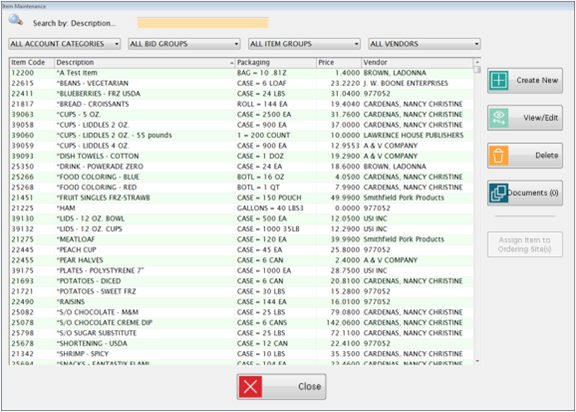
Highlight any column heading in the upper grid to Search by that column.
The prices, packaging and vendor information are all listed by Bid Dates.
 Filters
and Searching
Filters
and Searching
Did you know that when
you set a Filter type (Description, Packaging, Price, etc.), select an
item, click View/Edit and
then return to the main screen by clicking  ,
your previous filter and item remains selected?
,
your previous filter and item remains selected?
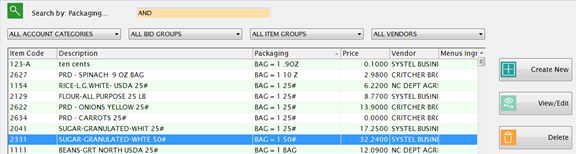
Click
 to create a new item. See
How to Set Up a New item
to create a new item. See
How to Set Up a New item
Highlight
a row and click  to
view or edit an existing item in the grid.
to
view or edit an existing item in the grid.
Highlight
a row and click  to
delete an inventory item.
to
delete an inventory item.
o An item cannot be deleted if On Hand inventory exists, if it is in an open BID, or if it associated to a MP Menus ingredient.
§ If there is no On Hand, open bid, or association with Menus, and no Transaction History exists, the item will be deleted.
§ If there is no On Hand, open bid, or association with Menus, but there IS transaction history, it will be marked as Inactive and all associated bid information and group assignments will be deleted. The item will no longer be displayed on the Item Maintenance and Transaction screens, but its history will be available for the Transaction History and Transaction Summary reports.
Click
the  button to attach documents to a record. Please see Document Cabinet
for complete instructions.
button to attach documents to a record. Please see Document Cabinet
for complete instructions.
Highlight
a row and click  to
manage the sites’ ordering rights for this item.
to
manage the sites’ ordering rights for this item.
o The sites that are currently allowed to order this item are listed on the right side under Selected Sites.
o Sites that are not permitted to order this item are listed under District Sites on the left side.
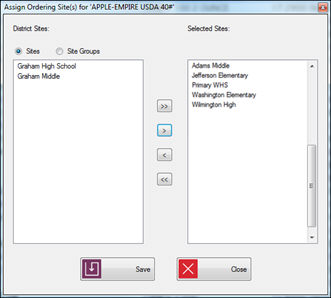
o If you want to prevent orders at a site, remove that site from the Selected Sites list on the right.
o This does not prevent other transactions (such as Receiving, Adjustments and Usage) for existing inventory.

 The single
arrows can be used to move a highlighted site to the left or right.
The single
arrows can be used to move a highlighted site to the left or right.

 The double arrows move all sites to the left or right.


In some cases, an outside vendor provides warehouse storage and delivery services for the district.
The district actually owns the inventory but it is stored at a 3rd party warehouse.
The vendor charges a handling fee for warehouse deliveries.
The Handling Fee is entered under the Items’ bid price settings.
Handling fees apply only when the inventory is shipped to the schools using Warehouse Orders done through the regular ordering process.
Handling fees are not applied if the inventory is transferred from site to site without Warehouse Orders.
Warehouse Orders for item with handling fees will also create Purchase Orders for the fees that will update the GL the same as Vendor POs.
The Vendor for Handling Fee Purchase Orders is selected under Site Setup for the Primary Warehouse Site.
The Expense Account code for Handling Fee POs is set up under Inventory Accounts: Handling Fee.