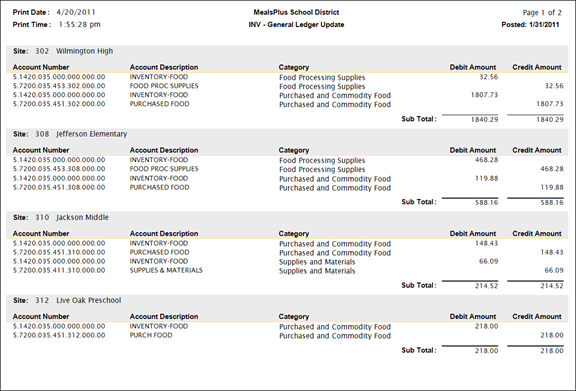
When you close a period, you will also have the option to create journal entries to update the general ledger if you are interfacing with LINQ or Sunpac General Ledger.
Click Yes to calculate and post journal entries to the general ledger.
You will get a report preview that shows the debits and credits.
o The report will be previewed on the screen and can be sent to the printer or exported using the dialog buttons at the top left of the preview.
The Account Codes for the journal entries are set up by Site and Account Category under Inventory Accounts.
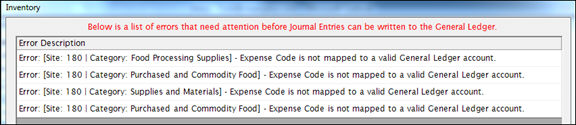
If you get an error report when you attempt to create journal entries, check the following settings:
o Account mapping: All Sites and Categories must be mapped to general ledger accounts in Inventory Accounts.
o Inventory Items: All Inventory Items must be associated with an Account Category in Item Maintenance.
o Sites: All Inventory Sites must exist in the general ledger.
If errors occur, the Transaction Summary Close will be canceled.
For each Site and Account Category, the Transaction (Net Change) Value on the Transaction Summary Report is the sum of all the Transactions for the Site/Category during the Inventory Period.
o It includes all transactions that affect on-hand inventory values, including Receipts (both Purchased and Commodity), Usage, Adjustments and Transfers (in or out of a site).
o Since it is a summary of all value changes, the amount can be used to update the general ledger accounts.
Debit the Category Asset Account (from Inventory Accounts) for each Site and Category
o If there is an increase to the inventory on hand (positive Net Change amount), the debit to the asset account results in an increase to the asset account balance.
o A decrease to inventory (negative Net Change amount) results in a decrease to the asset account balance.
Credit the Category Expense Account (from Inventory Accounts) for each Site and Category
o The credit to the expense account offsets the Accounts Payable entries which debited the entire expense at the time of invoice accrual.
Debit the Category Expense Account for the To Site.
Credit the Category Expense Account for the From Site.
An additional journal entry is done for Commodity Receipts during the Transaction Summary date range.
o This entry only picks up receipts that were entered under Transactions: Receive Commodity.
Debit the Category Expense Code.
o Since there was no invoice accrual for Commodities Received, the Expense Account was not debited at the time the inventory was received. The Net Change entries (above) will include the offsetting Credit to the expense account for inventory that remains at the end of the period.
Credit the Commodity Revenue Code.
o This updates the Commodity Revenue account in the general ledger for the value of the commodities received.
NOTE: Commodity receipts are not reported separately on the Transaction Summary.
o To view the Commodity Receipts used in calculating the journal entry, go to Transactions – Receive Commodity and select the closed receipts within the Transaction Summary date range.
When Journal Entries are successfully created, it will preview the Transaction Summary report first.
When the Transaction Summary preview is closed, you will get a report of the journal entries that were created.