If you are receiving new USDA Commodities into the system, be sure
to use the Receive Commodity option
in order to create the journal entries for USDA receipts.
If you are receiving new USDA Commodities into the system, be sure
to use the Receive Commodity option
in order to create the journal entries for USDA receipts.This screen is used to record the purchased inventory that comes into a site from vendors and also the inventory received at schools from internal warehouse orders.
If you are receiving new USDA Commodities into the system, be sure
to use the Receive Commodity option
in order to create the journal entries for USDA receipts.
However, if you are processing Warehouse Orders for commodities that are already in your warehouse, it should be done using this screen.
You will also have the option to accrue invoices when Receipts are saved if you have security rights. Please see details below.
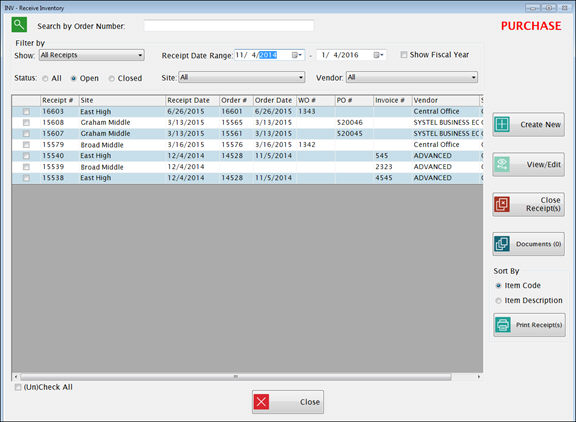
The first screen shows a list of all pending receipts, based on the orders that have been processed.
Click the  button to attach documents to
a record. Please see Document
Cabinet for complete instructions.
button to attach documents to
a record. Please see Document
Cabinet for complete instructions.
To receive an existing Purchase Order or Warehouse Order, highlight the row and click View/Edit.
The Receipt Date that displays on the next screen will be the Delivery Date from the order, but this can be changed if necessary.
Be sure to use the date the inventory is actually received.
The Vendor and PO# will be pre-filled if you are receiving with a Purchase Order.
o If you are receiving a Warehouse Order, the primary warehouse will be listed as the Vendor.
Enter the Invoice Number supplied by the vendor.
o A unique Invoice Number is required for each invoice per vendor to prevent paying the same invoice more than once by mistake.
§ If there is a valid reason why the same invoice for a vendor needs to be processed more than once, you will need to make each invoice number unique (possibly by adding additional characters at the end). Check with your finance department if you have any questions on local policies that may apply.
Comments are optional.
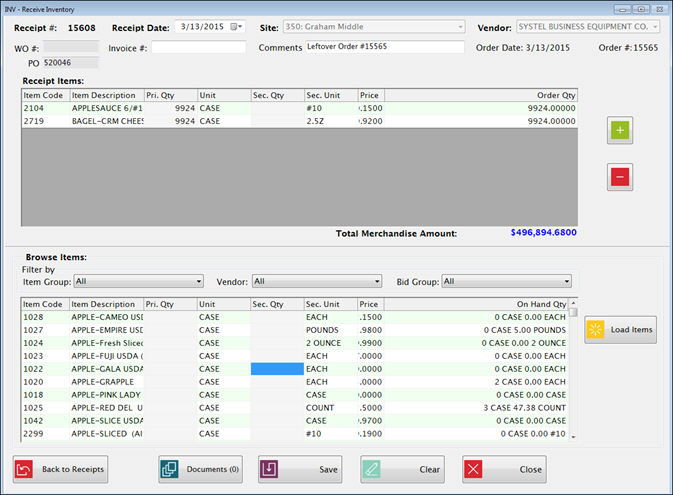
Verify that you received the Items and the quantities listed under Receipt Items (upper grid).
Increase or decrease the Primary or Secondary quantities if you did not receive the quantity that was ordered. Increase or decrease the Primary or Secondary quantities if you did not receive the quantity that was ordered. It allows up to (4) four digits (ex. $9999) for Primary and Secondary Quantities. Secondary Quantities can be edited only if ordering secondary quantity is allowed in Item Maintenance or was at the time the order was created.
o If an item was ordered but not received, change the quantity to 0 or delete that line using the red minus button.
o You can add items directly to the upper grid with the green plus button, or use the Browse grid at the bottom to locate items and add the quantity from there.
Prices may be changed in the upper grid, if necessary. You must have security rights to allow changing the price. The lower grid does not accept prices changes.
o However, it is not usually necessary to change prices if you have a Purchase Order since POs are based on the current bid prices.
Total Merchandise Amount gives a running total of the inventory value of the items received.
When all items are entered, click Save.
There are three choices on the Save Receipt screen:
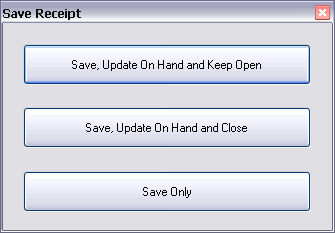
Click
 to
receive inventory without referencing an order.
to
receive inventory without referencing an order.
o This is for recording receipts from vendors or the warehouse when there was no order placed in advance.
o This screen is similar to the receiving from an order, but there is more flexibility here.
§ Example: you may select a different Vendor or receive at a different price than what is currently in Bid Price setup. You must have security rights to allow changing the price.
§ This feature is useful if you need to purchase an item “off bid” if the item is not available from the usual vendor.
Enter the Receipt Date, Site, and each Item number and Primary or Secondary Quantity.
The Bid Price will be displayed automatically.
o You can change the price in the upper grid if necessary.
o The lower grid does not accept prices changes.
When you click Save you can either Update On Hand and Close or Save Only.
Negative quantities may be entered in Receiving in order to deduct items from inventory that are being returned to the vendor.
o Negative Receipts will result in a Credit Memo (deduction from the amount to be paid) if an invoice is accrued from the negative receiving.
Enter a negative for the Quantity only.
The Price should be the positive value of the returned item (per Primary unit).
To determine what inventory to deduct from On Hand, FIFO basis is used if possible.
If there is enough in the oldest On Hand row to cover the negative receipt, and the price in that On Hand row is the same as the price entered on the Receiving screen, it deducts from the oldest On Hand row.
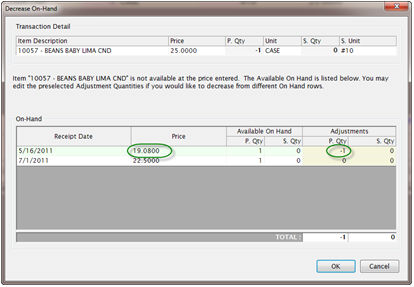
If the price entered in receiving does not match the oldest On Hand price, or if there is not enough available to deduct the quantity entered, it will give a pop-up screen for selecting the On Hand to deduct.
In the example shown below, the Quantity is -1 and the receiving price entered is $25.00.
The oldest On Hand row has enough in the quantity but it is priced at $19.08. You can either leave the -1 on the oldest row, which will use $19.08 as the price, or change that row to zero and put the -1 on the $22.50 row to return at the inventory at the newer price.